To automate GitLab code review, run Kiro CLI in headless mode when a merge request (MR) opens or gains a commit. Kiro reads the diff and returns findings as JSON. A GitLab bot posts each validated finding beside its line. A maintainer can then reply to one discussion to request a fix and see the resulting commit reviewed again.
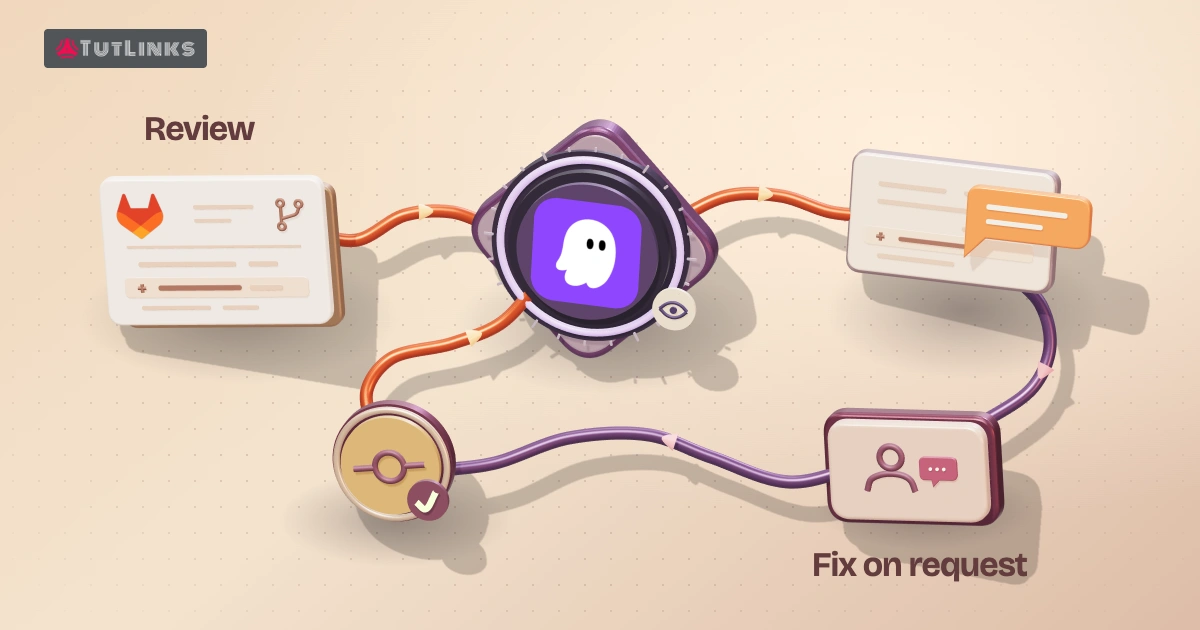
Each merge request update starts an automated code review. The examples supply GitLab CI configuration and API calls. You implement the HTTPS webhook receiver and two shell scripts, one for review and one for fixes. The runner needs Git, curl, jq, and Kiro CLI. You can test inline discussions at the end of step 4 before granting permission to push. The disposable MR in the last section lets you verify both workflows on your own GitLab instance. If your repositories live on GitHub, follow the companion walkthrough with its public example pull request and fix run. Automate GitHub code review and fixes with Kiro CLI in headless mode.
1. Choose where to run automated GitLab code review
Create a test branch in your application project and a second GitLab project for the automation. In the automation project, protect the default branch, give it a runner, and keep its CI definition, Kiro agents, and validation scripts there. Set the application’s numeric project ID and the v4 API root in trusted configuration. For GitLab.com, set GITLAB_API=https://gitlab.com/api/v4. Inside GitLab CI, the predefined CI_API_V4_URL supplies your instance’s API root. The examples assume one application project and a default automation branch named main.
Why two projects? A native merge_request_event pipeline uses CI configuration from the source branch. For a trusted internal team, that pipeline can run the review directly if its configuration and secret eligibility meet your requirements. The separate automation project also works when contributors can change .gitlab-ci.yml. A signed event starts a trusted pipeline there, and the runner fetches the proposed commit as data. GitLab merge request pipelines.
| Component | Credential | Job |
|---|---|---|
| Kiro reviewer or fixer | KIRO_API_KEY | Run the headless CLI. An API-key-enabled Kiro subscription is required. |
| GitLab discussion publisher | Project access token with api scope and a suitable project role, such as Developer | Read MR metadata and publish line comments. |
| Fix push step | Separate bot credential with write_repository and permission to push the source branch | Publish the validated commit over Git HTTPS. |
| HTTPS receiver | Webhook signing secret, read access for membership and MR checks, and an automation-project pipeline trigger token | Authenticate the event and start a protected pipeline. |
On GitLab.com, project access tokens require Premium or Ultimate. They are available on all GitLab Self-Managed tiers. A suitable service account is another option where supported. Mask and protect sensitive CI variables. Give Kiro an isolated environment with its own key, a clean home directory, and a credential-free checkout. Keep GitLab tokens and saved Git credential helpers outside that environment. GitLab project access tokens · Kiro API key authentication.
2. Route merge request updates and fix requests
In the application project, open Settings → Webhooks and register your HTTPS receiver for Merge request events and Comments. GitLab 19.1 and later support generally available signing tokens. Verify the signature against the original request bytes and check the timestamp using the documented procedure. If your GitLab version uses the older shared secret, compare the incoming X-Gitlab-Token to the configured secret on the receiver. GitLab webhook authentication.
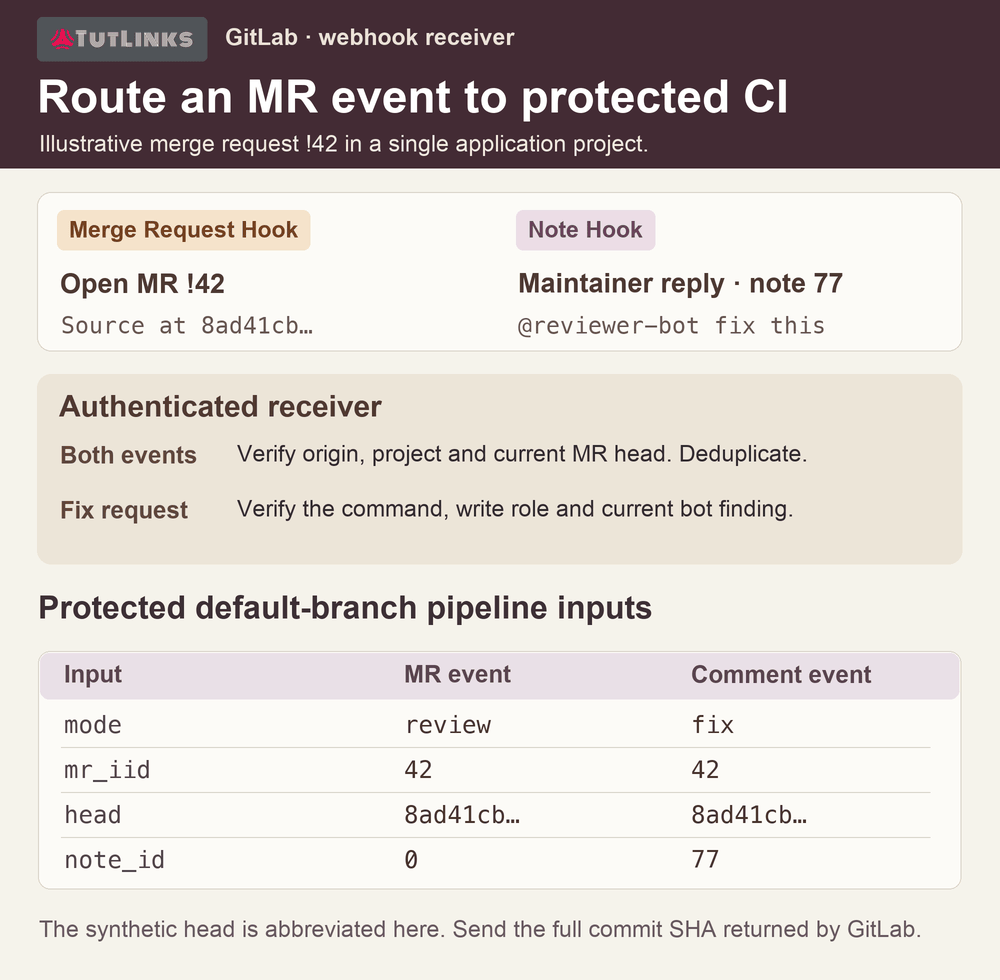
For a merge request event, fetch the MR through GitLab’s API. Queue a review when an open MR first appears or its source head changes. An update can also mean someone changed the title. Store the project, MR IID, and head SHA so a repeated event for the same revision does not launch a second review. IID is the project-local number after the exclamation mark in a reference such as !42.
For a comment event, accept a newly created user note on a merge request. GitLab sends X-Gitlab-Event: Note Hook, object_kind: note, and object_attributes.noteable_type: MergeRequest. Match the full command and ignore bot accounts and system notes. For example, a maintainer can reply @reviewer-bot fix this in a bot-authored discussion. Replace the example mention with your bot’s username. The authorization checks in step 5 apply before a fixer is queued. GitLab webhook events.
Use a pipeline trigger token for the automation project. The receiver passes the MR IID, the reviewed commit SHA, and the originating note ID for a fix. It chooses the default branch from trusted configuration. The following call uses form inputs supported by GitLab’s pipeline trigger API, generally available since GitLab 18.1. For a review, set MODE=review and NOTE_ID=0. Trigger a pipeline with inputs.
curl --fail --silent --show-error --request POST \
  --form-string "token=$GITLAB_TRIGGER_TOKEN" \
  --form-string "ref=$AUTOMATION_DEFAULT_BRANCH" \
  --form-string "inputs[mode]=$MODE" \
  --form-string "inputs[mr_iid]=$MR_IID" \
  --form-string "inputs[head]=$EXPECTED_HEAD" \
  --form-string "inputs[note_id]=$NOTE_ID" \
  "$GITLAB_API/projects/$AUTOMATION_PROJECT_ID/trigger/pipeline"
Follow one GitLab code review through the receiver. Suppose MR !42 opens on your test project. After authenticating the delivery, the receiver fetches MR 42, records its full head SHA, and sends mode=review, mr_iid=42, that SHA, and note_id=0. Redeliver the same event and check the pipeline list. There should still be one review for that revision. A title edit on the same revision should also leave the count at one.
Now suppose a maintainer replies to the bot’s discussion and GitLab assigns the new note ID 77. The receiver fetches note 77, checks the discussion, the requester’s role, and the current head. It sends mode=fix and note_id=77 for the same MR and reviewed SHA. The note ID identifies the maintainer’s reply. The discussion ID identifies the thread containing the finding. If the source branch advances before the reply is processed, start a review for the new revision and leave the old request unfulfilled. These numbers are illustrative. Use the complete SHA and IDs returned by your instance.
Define the inputs and jobs in the automation project’s .gitlab-ci.yml. The two shell scripts below are entry points you implement in that project using steps 3–5. The trigger starts both kinds of work on the trusted branch. Each pipeline runs only the job selected by its mode.
spec:
  inputs:
    mode:
      options: [review, fix]
      default: review
    mr_iid:
      regex: '^[0-9]+$'
      default: '0'
    head:
      regex: '^([0-9a-f]{40}|[0-9a-f]{64}|unset)$'
      default: 'unset'
    note_id:
      regex: '^[0-9]+$'
      default: '0'
---
workflow:
  rules:
    - if: '$CI_PIPELINE_SOURCE == "trigger" && $CI_COMMIT_BRANCH == $CI_DEFAULT_BRANCH'
    - when: never

variables:
  MODE: $[[ inputs.mode ]]
  MR_IID: "$[[ inputs.mr_iid ]]"
  EXPECTED_HEAD: "$[[ inputs.head ]]"
  NOTE_ID: "$[[ inputs.note_id ]]"

review:
  rules:
    - if: '$MODE == "review"'
  timeout: 15 minutes
  script:
    - bash ci/review.sh

fix:
  rules:
    - if: '$MODE == "fix"'
  resource_group: "kiro-fix-$MR_IID"
  timeout: 20 minutes
  script:
    - bash ci/fix.sh
3. Run the GitLab merge request review with Kiro CLI
In ci/review.sh, resolve the MR from the configured application project and a positive MR IID. Fetch its diff versions and select the latest one, which GitLab lists first. Save its ID and the three SHAs for the posting step. Verify that head_commit_sha equals the trigger’s expected head. If the version is still being prepared, retry briefly. If a newer commit has arrived, let its review take over. GitLab merge request diff versions.
MR_API="$GITLAB_API/projects/$APP_PROJECT_ID/merge_requests/$MR_IID"
curl --fail --silent --show-error \
  --header "PRIVATE-TOKEN: $GITLAB_REVIEW_TOKEN" \
  "$MR_API/versions" |
  jq -e --arg head "$EXPECTED_HEAD" '
    .[0] | select(.id and .base_commit_sha and .start_commit_sha
                  and .head_commit_sha == $head)
    | {id, base_commit_sha, start_commit_sha, head_commit_sha}' \
  > review-version.json
For a private application project, grant the checkout step read access. One option is to add the automation project to the application project’s CI job token allowlist. The identity that starts the pipeline must already have access. A separate credential with read_repository is another option. Remove any authenticated remote URL or credential helper before passing the checkout to Kiro. GitLab CI job token access.
Fetch the application project’s refs/merge-requests/<iid>/head into review-target/. Check that git -C review-target rev-parse FETCH_HEAD matches the saved head_commit_sha before checking it out. A shallow checkout can omit the base commit. Check for it with git -C review-target cat-file -e "$BASE_SHA^{commit}". If it is missing, fetch more target-branch history before generating the diff.
Keep the automation checkout at the workspace root. Check out the MR’s exact head under review-target/, then prepare a bounded diff from the saved base and head. For example, write the output of git -C review-target diff --find-renames "$BASE_SHA" "$HEAD_SHA" to review-input/mr.diff after setting the variables from the saved version. Give the agent the diff, changed paths, and target source tree. Keep the application’s hooks, MCP configuration, and agent files out of the trusted workspace configuration.
Create .kiro/agents/mr-reviewer.json in the automation checkout. Set tools and allowedTools to ["fs_read", "grep"], disable includeMcpJson, and instruct the reviewer to return strict JSON with a findings array. Each finding needs a repository-relative path, line number, severity, title, and practical explanation. Treat source files and comments as review material. Restrict the initial version to added lines so every reported position has an unambiguous side. Kiro custom agents.
Inside the isolated Kiro environment, run the CLI from the automation root. This example selects the V2 engine and its read and search tool names. The agent configuration limits the tools available. The trust flag lets those two run unattended. Pin the CLI version you validate in your runner image. Kiro headless CLI.
kiro-cli chat --v2 --agent mr-reviewer --no-interactive \
  --output-format stream-json --trust-tools=fs_read,grep \
  'Read review-input/mr.diff. Return the requested findings JSON.' \
  > review.jsonl
4. Post each finding as an inline GitLab discussion
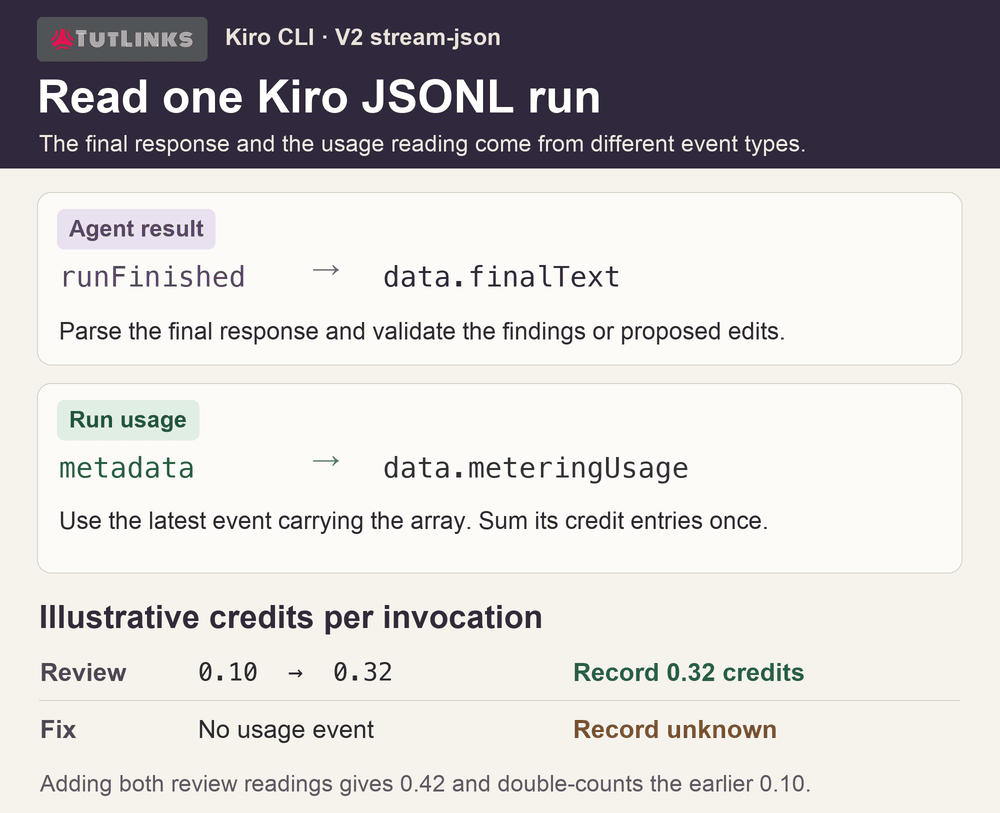
Ask the agent to return the JSON object without code fences. For V2, the following command extracts the final response from a successful stream. Fail the job if the CLI exited unsuccessfully or the extraction fails.
jq -Rne '
  [inputs | fromjson? | select(.type == "runFinished") | .data.finalText]
  | last | fromjson | select(.findings | type == "array")
' review.jsonl > findings.json
Validate the extracted findings before calling GitLab. Reject unknown severities, oversized messages, paths outside the repository, and lines outside the reviewed diff. A starting limit of 25 findings keeps a noisy run manageable. For a clean run, record zero findings in CI and leave the MR conversation quiet.
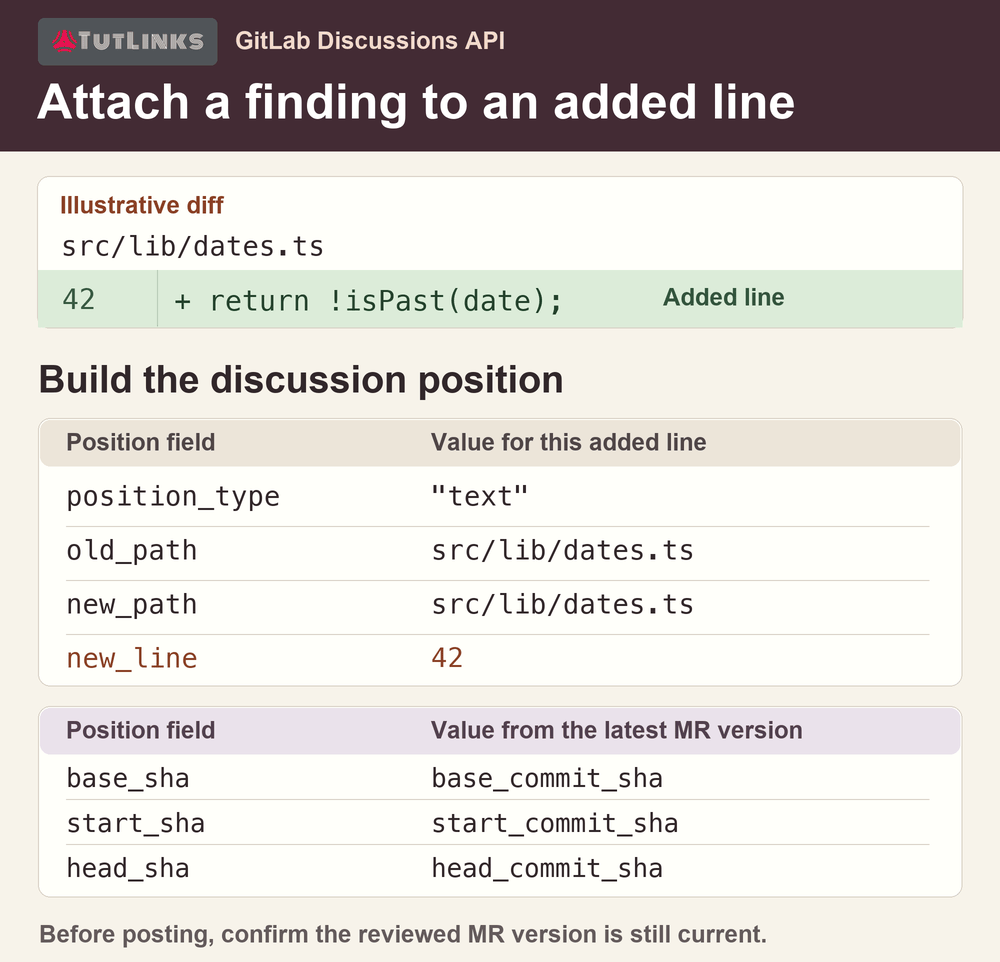
A path and a line number alone are insufficient for GitLab. Use the saved version to build the discussion position. The example assumes OLD_PATH, NEW_PATH, NEW_LINE, and BODY came from validated data for an added line. Recheck that this version still matches the current MR before posting. GitLab Discussions API.
jq --arg old "$OLD_PATH" --arg new "$NEW_PATH" \
   --argjson line "$NEW_LINE" --arg body "$BODY" \
   '{body: $body, position: {
      position_type: "text", base_sha: .base_commit_sha,
      start_sha: .start_commit_sha, head_sha: .head_commit_sha,
      old_path: $old, new_path: $new, new_line: $line
    }}' review-version.json > discussion.json

curl --fail --silent --show-error --request POST \
  --header "PRIVATE-TOKEN: $GITLAB_REVIEW_TOKEN" \
  --header 'Content-Type: application/json' \
  --data-binary @discussion.json "$MR_API/discussions"
Use both old and new paths even when they match. For an added line send new_line alone. If you later support removed lines, send old_line alone. For unchanged context, supply both line numbers from the diff. Store the returned discussion ID with the reviewed SHA and expected bot ID. These identifiers let the fixer select the right finding later.
5. Authorize a fix, validate the edits, and re-review
When someone replies @reviewer-bot fix this, the receiver fetches the actual note and finds the MR discussion containing that note ID. Query GET /projects/:id/members/all/:user_id for the requester’s effective project membership, including inherited access. Verify a current write-capable role under your policy and branch rules. Verify that the discussion belongs to this MR, the original finding came from your bot, and the finding’s SHA matches the current head. Deduplicate the delivery and reject fork pushes by default. Only now should the receiver trigger mode=fix. GitLab project members API.
In ci/fix.sh, repeat those checks using the passed note ID and expected head. A queued job may start after the branch or membership changes. Run a second read-only agent against the selected finding. Ask for path, old, and new text for each proposed replacement. In trusted code, resolve every path beneath the target checkout, reject symlinks and protected files, and require exactly one match for each old string. Validate the entire plan before writing anything.
Run the project’s tests in an isolated environment without the Kiro key or GitLab write token. Recheck the remote head immediately before a normal, non-force push. The bot commit should descend directly from the reviewed SHA. Dispatch or observe one fresh review for the resulting head and let the same revision deduplication handle overlapping events. If a developer pushes while the fix is being prepared, discard the stale plan and review the new revision before retrying.
Verify automated code reviews in GitLab on a disposable merge request
Change a date comparison so future tasks appear overdue. Open a test MR and check whether a discussion appears beside the changed line. Reply in that thread as an authorized maintainer. Compare the fix commit and the SHA reviewed by the follow-up job. Test yesterday, today, and tomorrow to verify that the behavior actually changed.
| Observation | What to inspect |
|---|---|
| The pipeline never starts | Check webhook delivery, trigger token, default-branch ref, and the workflow rule for pipeline source trigger. |
| A finding is rejected | Compare both paths, the diff-side line, and all three SHAs with the latest MR version. |
| A reply produces no commit | Check the exact command, note type, membership, bot authorship, and current head. Try a read-only user and a stale finding as negative tests. |
| The bot pushes twice or starts duplicate reviews | Check delivery deduplication, per-MR fix concurrency, and the recorded review for each head. |
Pause fixes while keeping reviews running. If verification exposes a problem with the fixer, stop dispatching mode=fix in the trusted receiver. Check the automation project’s pipeline list for queued and running fix jobs. Cancel them if you need an immediate pause, then inspect the MR head for a push that completed before cancellation. A receiver change affects future deliveries. It cannot recall a job that GitLab already accepted.
Push the known test defect and confirm a successful GitLab code review with a current bot finding on that head. Reply to that finding as the same authorized maintainer and verify that no fix job starts. If a fix was already pushed, inspect the specific commit with the branch owner and revert it through the project’s normal review process. When you re-enable the receiver, use a fresh reply on a current finding. Replaying a saved note can select a discussion for an older version of the diff.
Read the credit total for a GitLab code review
Record reviewer and fixer usage separately. For the V2 JSON stream, use the latest metadata event containing meteringUsage, sum its credit entries using decimal arithmetic, and record unknown if metering is absent. Treat this as observed CLI behavior that can change with releases. Publish a small kiro-usage.json job artifact with the mode, pipeline ID, job ID, head SHA, credits, and outcome. That gives a maintainer a direct trail from the discussion to both runs. GitLab job artifacts.