I knew something was wrong with Orca on AWS when I walked away from my laptop and the phone could no longer reach my coding session. I had put the agent on EC2 precisely so I could leave the laptop behind. Scanning a pairing QR at my desk had been a poor test of that promise.
By the end of the week, the question had changed. I had started by asking where to run Codex. What I actually wanted was a development laptop in the cloud, somewhere to leave a build running, install a project SDK, and pick up the same work from another device. That distinction explains both the GPU bill and why the phone has its own line in the diagram.
1. Give Orca on AWS a computer it can come back to
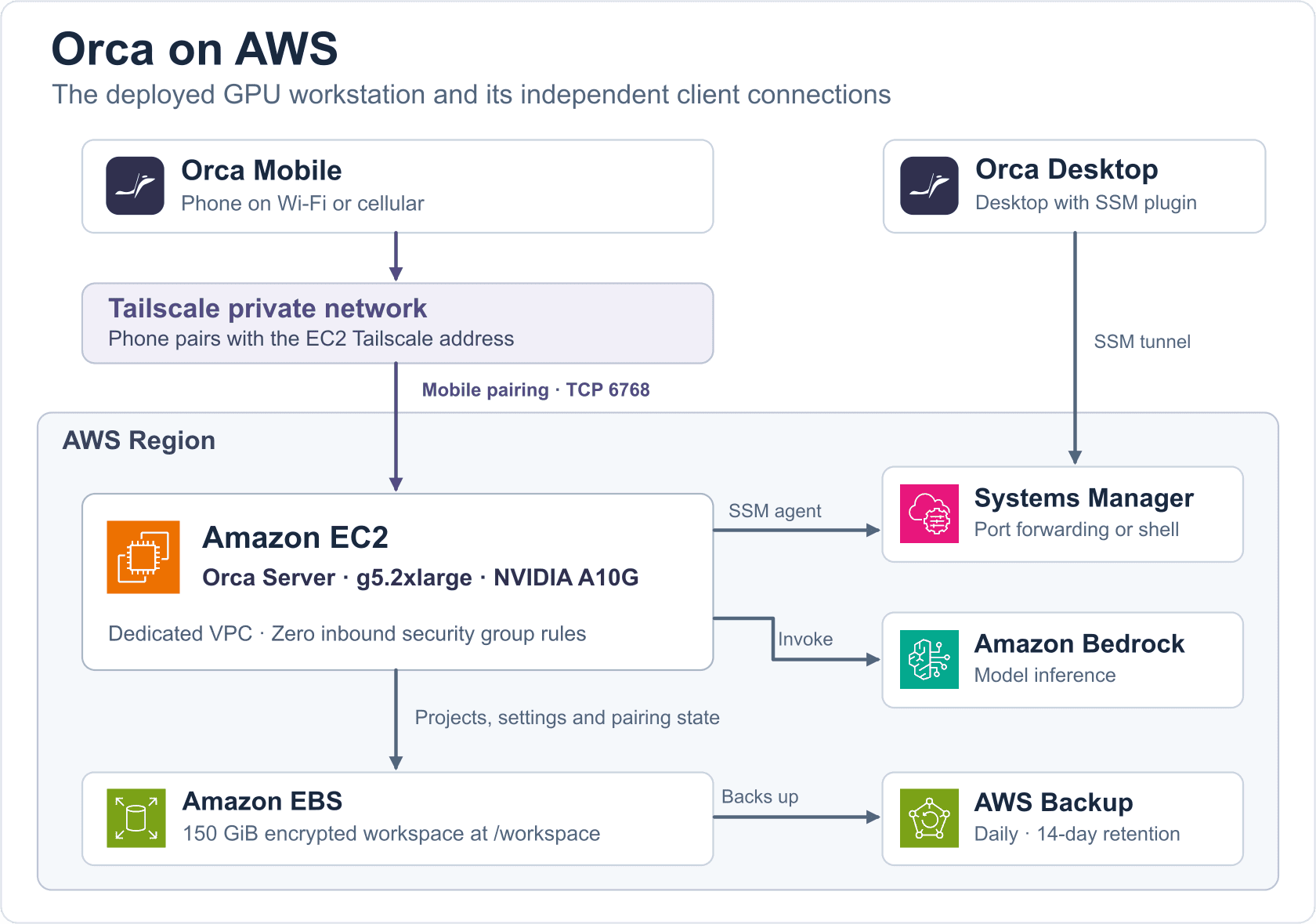
A durable Lambda workflow was one option we considered. My daily work looked like a shell with a half-finished build, another shell running tests, and several Git worktrees on disk. I wanted to close a client and come back to those processes. EC2 gave Orca a long-running Linux host with a service manager and a persistent workspace. Bedrock could handle model inference separately.
2. Make the model answer before picking the region
Our first region could host Orca on AWS. The deciding question was whether the regional endpoint used by Codex could serve the models we wanted. The general Bedrock catalog and the model list returned by that endpoint gave different answers. We chose Northern Virginia (us-east-1), moved execution and inference together, and removed the earlier deployment.
The same lesson paid off when GPT-6.2 Sol and Astra arrived. We ran fresh requests using the EC2 role and verified replies before making Sol the Codex default. OpenCode got its own Bedrock configuration. Seeing a model in either picker tells me what I can select. Getting a reply tells me what this account, region, and agent can actually use. Codex configuration and model check
3. A paired phone still needs a route home
The desktop could connect through a Session Manager port forward. Its loopback address made perfect sense there. Give that address to a phone, however, and the phone tries to reach itself. One of the least helpful symptoms was WebSocket closed (1006). It told us that a connection had ended, but gave us no reason.
We gave the mobile client its own Tailscale route to EC2, allowed that client in the host firewall, and generated a mobile offer that advertised the host’s tailnet address. Then I ran the test I should have tried first. I switched off phone Wi-Fi, let the desktop sleep, sent a new message, and got a reply over cellular. We kept the EC2 security group closed to inbound connections. Desktop and mobile pairing
4. Memory pressure and a missing GPU were two different problems
During one outage the small host ran out of RAM and swap while a browser, Python, and coding processes were active. A child process was killed, and Orca stopped with it. After the service recovered, the desktop tunnel was still listening locally but could no longer complete a WebSocket handshake. More memory helped the workstation. Testing a real handshake helped detect a stale tunnel.
Moving Orca on AWS from T3 to G5 answered a different question. A project brought in an SDK that needed CUDA. If this machine was going to stand in for a development laptop, it needed to run that SDK where the code lived. We chose a g5.2xlarge with 8 vCPUs, 32 GiB RAM, and one NVIDIA A10G. Bedrock still served the language model. The GPU was there for the developer’s code.
To check that distinction, we opened an Orca terminal and used PyTorch to sum the squares of the integers from 0 through 15 on CUDA. It returned 1240. That told us more than seeing the card in nvidia-smi. If an agent will launch the SDK from another process, repeat the test there. Its device permissions can differ from the terminal’s. GPU checks and sizing
5. Give AWS calls and local SDKs the permissions each needs
Adding OpenCode exposed a limit in the original Codex permissions. The host could already call the OpenAI route through Bedrock, while OpenCode also used Bedrock Runtime and inference profiles. We extended the EC2 instance role for the required Bedrock actions. The host gets temporary credentials through its instance profile, so pairing another device does not mean copying AWS keys to it.
Deploying a project was another distinct job. We kept its cloud deployment permissions in a separately authorized role. Whoever controls that role’s policies and trust controls what a project can do in AWS. Backup jobs use their own service role. This keeps a new installation of Orca on AWS from inheriting someone else’s infrastructure privileges. Workstation IAM and trust boundaries
Inside EC2, a broader IAM role would have done nothing for a Python package that needed to write files or open a GPU device. The Orca process got writable project environments and access to the NVIDIA devices it needed. The administrator retained responsibility for the system driver and kernel packages. The GPU calculation succeeded as an unprivileged Linux user. Even the agent’s “Full access” approval setting was a separate decision about prompts. Related TutLinks guide to AWS MCP tools
6. Decide what must survive a rebuild
A child worktree failed with EACCES because a saved workspace location pointed into a directory the service user could not traverse. An empty project hit a different snag: the remote user needed a Git author identity to make its first commit. Both failures were visible in the client, and both fixes belonged on the computer that owned the files.
For Orca on AWS we kept a 30 GiB root disk for the operating system and a separate 150 GiB encrypted gp3 volume for the workspace. AWS Backup protects that volume daily, with 14-day retention. SDKs installed only on the root disk still need an installer or a suitable image. A backup of a workspace that holds agent sign-ins also needs the same care as the original. Worktrees and first-commit setup
7. Check which computer owns the feature
A desktop update added the button to create a bot. The remote host still said it could not run one. The button belonged to the client, but the capability had to come from the Linux server. We checked the capability the running server advertised and updated that component. Codex, OpenCode, and Kiro CLI then each had their own verification path.
Kiro offered a memorable example. The browser said the device request was approved while the CLI reported InvalidGrantException. The CLI could not save the device registration from inside the service. Giving its retained data directory the correct write access resolved the storage problem. When signing in this way, the device you authorize is the cloud workstation. Kiro’s --trust-all-tools also permits shell, file, and MCP actions without prompting. Choose those permissions for the data and credentials available on that host. Kiro sign-in and tool permissions
Reproduce the Orca on AWS deployment
The versioned reference includes the GPU configuration used above and a less expensive CPU option. You’ll need Git, Python 3.9 or later, AWS CLI v2, the Session Manager plugin, and a deployment profile with CloudFormation and IAM permissions. Check your G-instance quota and Bedrock model access in the selected region. The following commands use a POSIX shell. Versioned deployment reference · Install the Session Manager plugin
Preview the cost-bearing choices before creation
git clone --branch v0.2.0 https://github.com/windson/orca-on-aws.git
cd orca-on-aws
aws sts get-caller-identity --profile default

# Choose t3.large here for a CPU-only development workload.
ORCA_INSTANCE_TYPE=g5.2xlarge
python3 tools/deploy.py --stack aws-orca --region us-east-1 \
  --instance-type "$ORCA_INSTANCE_TYPE" --root-gib 30 --workspace-gib 150 --plan
The preview validates the template with CloudFormation and resolves an offered Availability Zone and an AMI. Use a compatible GPU-ready image with --ami-id for both commands, or plan to install the NVIDIA driver after boot. Once you are ready to incur charges, create a fresh stack with the same settings.
python3 tools/deploy.py --stack aws-orca --region us-east-1 \
  --instance-type "$ORCA_INSTANCE_TYPE" --root-gib 30 --workspace-gib 150
Verify inference as the service user
HOST_ID=$(aws cloudformation describe-stacks \
  --stack-name aws-orca --profile default --region us-east-1 \
  --query "Stacks[0].Outputs[?OutputKey=='InstanceId'].OutputValue | [0]" \
  --output text)
aws ssm start-session --target "$HOST_ID" --profile default --region us-east-1
To verify Bedrock inference for Orca on AWS, run the check below inside that EC2 shell. It starts a fresh Codex process as the workstation user and checks for the exact response ORCA_READY. This makes a billable Bedrock request.
sudo /opt/orca-workstation/agent/verify.sh --inferencePair mobile independently
Join EC2 and the phone to the same tailnet. Run these commands on EC2. At the allowlist step, replace the placeholder with the phone’s own Tailscale IPv4. The pairing offer uses the EC2 address. Keep the sign-in link and pairing QR private.
sudo tailscale up --hostname=aws-orca
sudo -iu orca orca-host host name --name aws-orca --json
sudo /opt/orca-workstation/access/allow-client add CLIENT_TAILSCALE_IPV4
sudo -iu orca orca-host pair --mobile --address "$(tailscale ip -4)"
Open Orca Mobile, scan the offer, and send a new prompt over cellular while the desktop sleeps. For desktop forwarding, use the separate desktop offer and keep the local Session Manager tunnel running. Desktop tunnel and pairing commands
What does Orca on AWS cost?
The moment a project needed CUDA, keeping the workstation available from a phone acquired a price tag. At 730 hours a month, the g5.2xlarge alone comes to $884.76. In the same example, asking GPT-6.2 Sol to process 10 million uncached input tokens and generate one million output tokens through Bedrock costs $33. The SDK needs the GPU. Calling Bedrock works from either host.
I priced four ways to run the workstation using AWS Pricing MCP on 20 November 2026. These are planning estimates in US dollars for US East (N. Virginia), using Linux On-Demand rates. Each row assumes the same amount of coding-agent inference.
| Workstation | AWS per month | First year with upkeep and setup |
|---|---|---|
| G5 GPU, always on | $940.91 | $12,490.92 |
| G5 GPU, 160 hours | $245.58 | $4,146.96 |
| T3 CPU, always on | $116.89 | $2,602.63 |
| T3 CPU, 160 hours | $64.97 | $1,979.67 |
For the always-on GPU, the rest of the monthly estimate buys 180 GiB of gp3 storage ($14.40), 60 GB-month of incremental workspace snapshots ($3.00), one public IPv4 address ($3.65) and seven detailed monitoring metrics ($2.10). I allowed 20 GB of internet traffic out within the available AWS allowance. Bedrock uses regional Standard short-context rates. Different models, longer prompts and more output change that part of the bill.
Stopping the GPU after eight hours on each of 20 working days saves $695.33 a month. The phone then has nothing to reconnect to overnight, and a scheduled bot cannot run while the host is stopped. If a project only needs CPU and fits on a t3.large, $116.89 a month keeps it reachable at any hour.
For first-year ownership I allowed four hours to set up and test the host, then one hour a month to patch it, review access and check recovery. At $75 an hour, that adds $1,200 to the annual AWS estimate. Substitute your own time and add any taxes, paid subscriptions or project infrastructure. Workstation cost breakdown and formulas · EC2 pricing · Bedrock pricing
One experiment I haven’t tried is moving the CUDA job to a GPU-accelerated Event Function on AWS Lambda Managed Instances. I’d keep Orca on the smaller CPU host so a paired phone can still reach its workspace, then run the same SDK test with GPU scale-to-zero enabled. I’d time the first result after an idle period, since provisioning a GPU can take several minutes. AWS bills for the underlying EC2 capacity, adds a management fee of 9.75% of its On-Demand price, and charges $0.20 per million requests. I’d compare a month of those charges plus the CPU host against the $940.91 G5 estimate for the same workload before calling it a saving. AWS GPU launch announcement · Lambda pricing
What I would keep in a smaller setup
If I deployed Orca on AWS again, I could give up the GPU for a project that only edits code and calls Bedrock. I would keep the independent mobile route, the retained workspace, and the test from the user account that actually runs the work. Those three caught failures an EC2 “running” indicator could never show me.
When you finish experimenting, stopping EC2 takes the workstation offline and stops compute charges. EBS and backups continue to cost money. The stack retains the workspace disk and backup vault on deletion. Record the outputs, then follow the cleanup guide for data you intend to discard. Teardown and retained resources