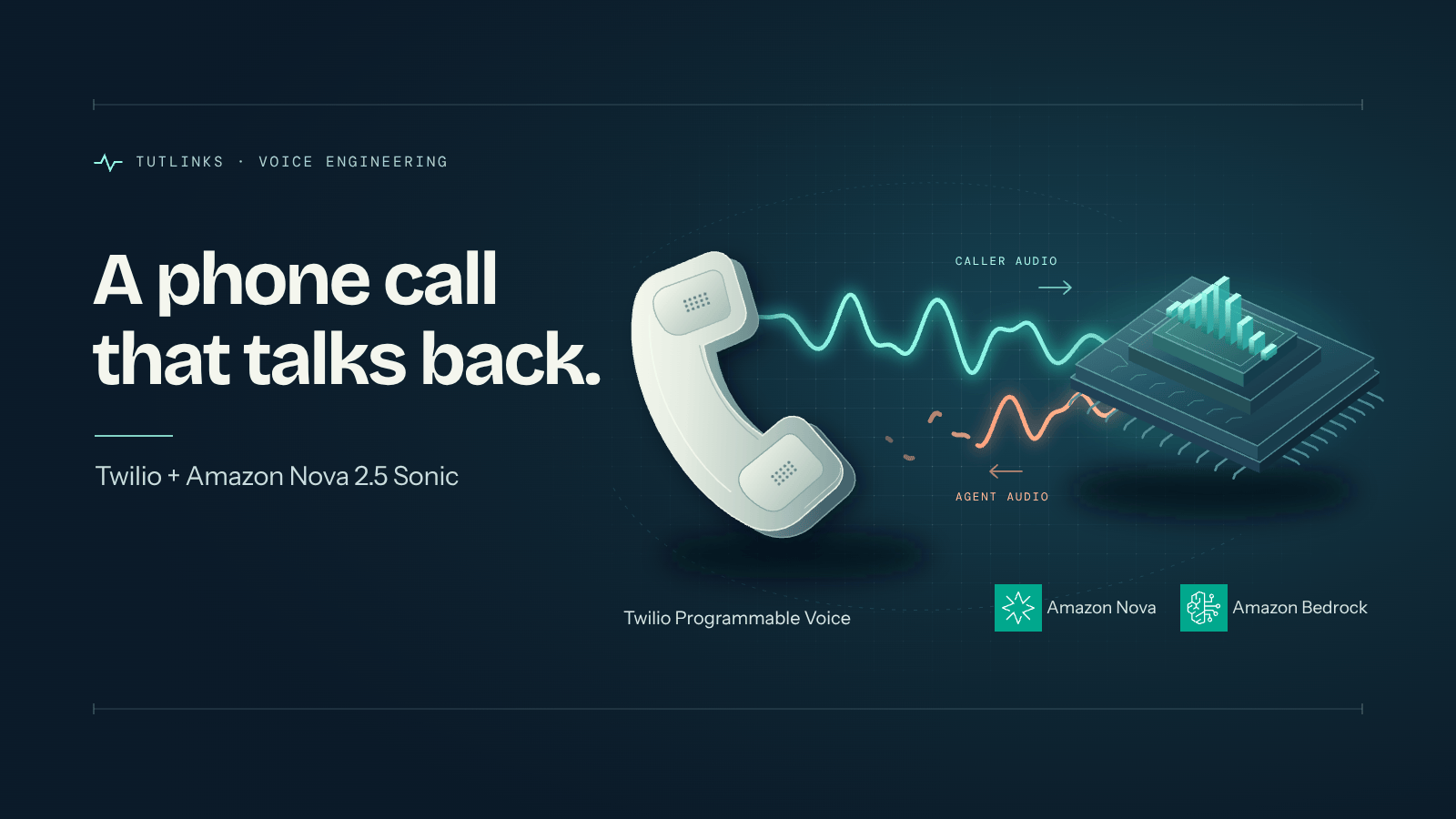
The hardest part of building a phone agent with Twilio and Amazon Nova 2.5 Sonic was getting the goodbye right. When Nova finishes generating a farewell, Twilio may still have speech left to play. And when the caller says “Wait, one more thing,” Twilio can return the same kind of playback acknowledgement after discarding that speech. The bridge has to tell those cases apart before it hangs up.
In this walkthrough, you’ll run a Python service that places a real outbound call with Twilio, streams the conversation through Amazon Nova 2.5 Sonic on Amazon Bedrock, and saves the result. The reference application uses a fictional invoice reminder: the agent introduces itself, asks whether it reached the right person, and can log a callback request. You can reuse the same bridge for appointment confirmations, order updates, or a support line that looks up a ticket while the caller is still talking.
How Twilio and Amazon Nova 2.5 Sonic connect
Twilio Programmable Voice dials the phone number, then Twilio Media Streams carries audio in both directions. FastAPI translates the audio, associates the stream with the call, and decides when the call is safe to end. The Strands SDK manages the model stream, forwards audio and text, and runs tools. Nova Sonic interprets speech and generates spoken replies in the same session, so this design does not need separate transcription and text-to-speech services in the live path.
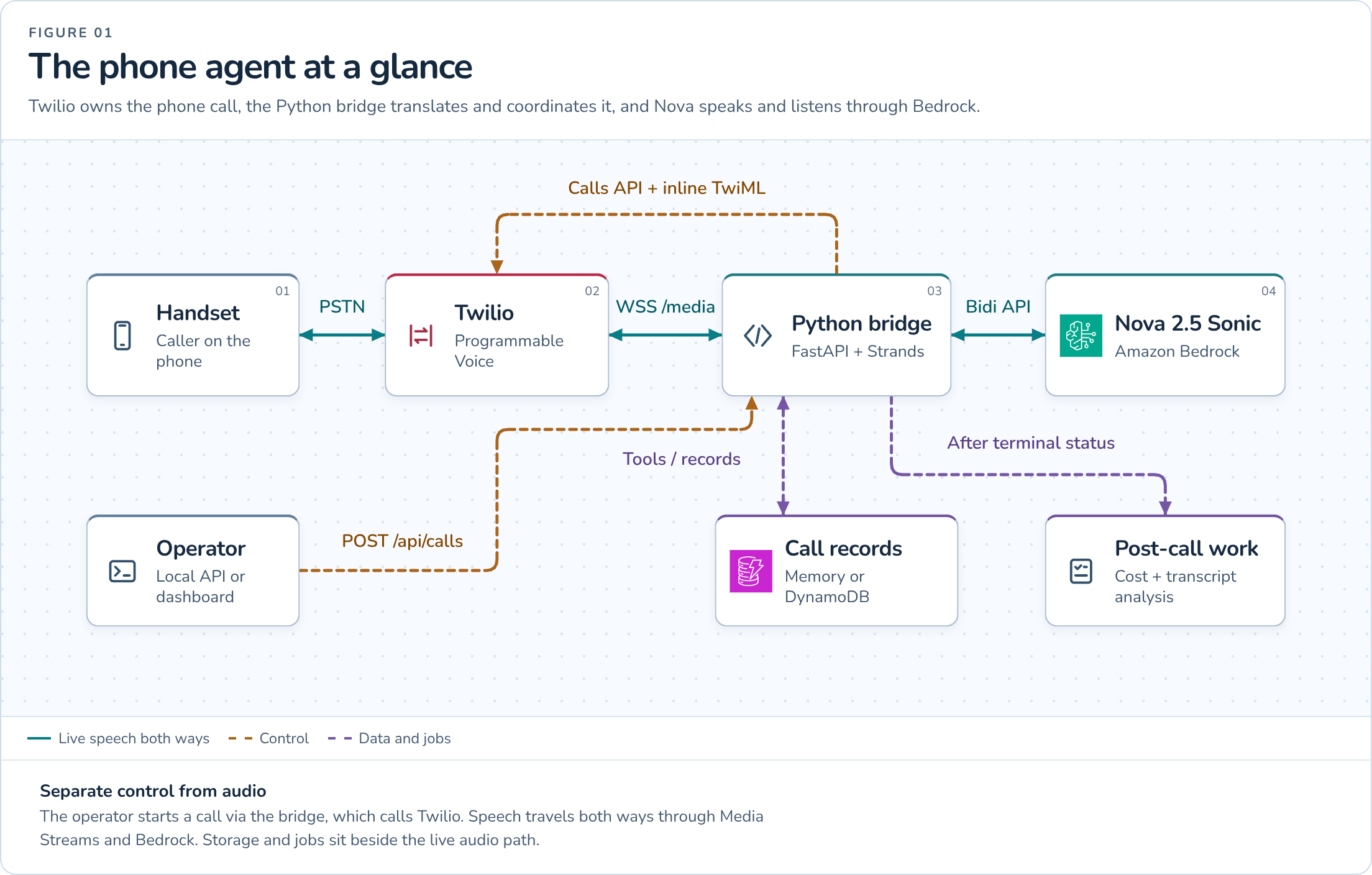
Open the interactive explorer and choose Architecture to follow the call from dialing to the agent’s first reply.
What Nova 2.5 Sonic does on this call
The AWS AI Service Card describes a streaming speech model that handles pauses and interruptions, accepts speech and text in the same session, and can call tools asynchronously. AWS reports improved instruction following and tool calling over Nova 2 Sonic. Here is where those capabilities show up in the sample:
| Capability | How the sample uses it |
|---|---|
| Speech and text in one session | A one-time text cue prompts the opening line. After that, caller speech and Nova’s spoken replies stream through the same Strands run. The handset has no text input. |
| Voice activity detection (VAD) and turn-taking | The bridge keeps sending caller audio during playback. Nova handles turn-taking; the bridge reacts to Strands’ barge-in event by clearing Twilio’s queued speech. |
| Asynchronous tool calling | Nova can request update_due_record or capture_payment_date_phrase while the call continues. Strands runs the tool; application code validates the request, writes the data, and reports the result. An offline test holds a write open while audio continues moving. |
| Polyglot speech | Tiffany opens in English. The sample prompts the same voice to follow English, French, and Spanish within one session, including when the caller switches languages. The language tests exercise all three closing phrases. |
AWS documents 18 voices across seven languages. The sample’s three-language policy covers its prompts and closing tools; it doesn’t block Nova from recognizing other languages or add a translation service. French and Spanish have their own fixed farewells and transcript checks: Au revoir and Adiós. The app captures a date phrase in the caller’s original language and resolves it later, outside the live audio path.
Run the demo and call your own phone
You’ll need Python 3.12, a Twilio account with a voice-capable number, a destination phone you control, and AWS credentials for a region that offers Nova 2.5 Sonic. For a Twilio trial, use a verified test destination. The example uses us-east-1 and the exact model ID amazon.nova-2-5-sonic. Allow bedrock:InvokeModel on the regional foundation-model ARN: that is the IAM action the Bedrock bidirectional API requires. Python 3.12 matters because the demo uses audioop, which Python 3.13 removed.
git clone https://github.com/windson/twilio-nova-sonic-2-5.git
cd twilio-nova-sonic-2-5
git checkout 8e0c50cad63cbe97529bf6508cbc0ca5ee98de68
python3.12 -m venv .venv
.venv/bin/python -m pip install -e '.[dev]'
cp .env.example .env
Twilio needs a publicly reachable wss:// endpoint with trusted TLS. Keep the operator API and dashboard on localhost: this sample has no operator authentication or Twilio signature validation. For a short test with fictional data, forward only /media. For example, save the following as media-only.yml and pass it to an authenticated ngrok agent:
on_http_request:
  - expressions:
      - "req.url.path != '/media'"
    actions:
      - type: custom-response
        config:
          status_code: 404
          body: Not found
ngrok http 8080 --traffic-policy-file media-only.ymlCheck that the public tunnel returns 404 for /api/dues. Put the tunnel’s HTTPS base URL in .env, without /media; the app builds the wss://…/media URL. Use your actual Twilio values in place of the placeholders and keep .env out of version control. Make AWS credentials available through the SDK’s credential chain. Leave DUES_TABLE and CALLS_TABLE blank to use the seeded in-memory store.
AWS_REGION=us-east-1
NOVA_MODEL_ID=amazon.nova-2-5-sonic
TWILIO_ACCOUNT_SID=<your-account-sid>
TWILIO_AUTH_TOKEN=<your-auth-token>
TWILIO_FROM_NUMBER=<your-twilio-number-in-e164>
TWILIO_VERIFIED_CALLER_ID=<your-test-handset-in-e164>
PUBLIC_BASE_URL=https://your-tunnel.example
Start the server in another terminal:
.venv/bin/python -m uvicorn app.main:app --env-file .env --host 127.0.0.1 --port 8080Before dialing, you can inspect the actual TwiML with no provider credentials or network call:
.venv/bin/python -c 'from app.twilio_client import build_stream_twiml; print(build_stream_twiml("https://example.test", account_id="ACC-1001"))'Then check the local service and place a call. The POST is live and can incur Twilio and AWS charges. The selected account supplies fictional context; the API always dials TWILIO_VERIFIED_CALLER_ID.
curl -fsS http://127.0.0.1:8080/healthz
curl -fsS http://127.0.0.1:8080/api/dues
curl -fsS http://127.0.0.1:8080/api/calls \
  -H 'Content-Type: application/json' \
  -d '{"account_id":"ACC-1001"}'
Answer, listen for the AI introduction, and confirm the fictional recipient: “Yes, this is Jordan Rivera.” Ask for a callback. To exercise language switching, say “¿Podemos continuar en español?” before asking for the callback. In one run, let the farewell finish. In another, say “Wait, one more thing” while it’s playing. A detected interruption should keep the call open. Afterward, fetch http://127.0.0.1:8080/api/calls/<call_sid> and inspect outcome, closing_language, and telephone_completion_confirmed inside the saved termination record.
If you prefer a dashboard, build it with Node.js 22 (npm --prefix frontend ci and npm --prefix frontend run build), restart Uvicorn, and open http://127.0.0.1:8080/. The browser is an operator console; the conversation happens on the phone. Close the tunnel when the test is done.
Deploy on AWS without buying a domain
Twilio requires a public wss:// endpoint on port 443 with a trusted TLS certificate that matches the hostname. It doesn’t require you to own the domain. That distinction mattered for this sample: the default AWS stack gives you an Application Load Balancer (ALB) with an HTTP listener. Its AWS-generated DNS name is reachable, but it doesn’t come with an HTTPS listener or a matching certificate for Media Streams. To connect Twilio directly to the ALB, use a name you control, such as voice.example.com. Point it at the ALB, set PublicHostname, and supply a matching ACM certificate in the ALB’s region via CertificateArn.
CloudFront was added to remove that domain and certificate setup for the demo. In the CloudFormation template, set EnableCloudFront=true and leave UseVpcOrigin=false for the public ALB path. Leave PublicHostname and CertificateArn blank. CloudFront supplies a distribution hostname such as d111111abcdef8.cloudfront.net and its default viewer certificate. The stack sets the ECS task’s PUBLIC_BASE_URL to that hostname automatically and exposes it as PublicBaseUrl and CloudFrontDomainName. The TwiML then points Twilio at:
wss://d111111abcdef8.cloudfront.net/mediaCloudFront terminates viewer TLS on port 443 and forwards the HTTP/1.1 WebSocket upgrade to the ALB on port 80. The ALB forwards it to FastAPI on ECS Fargate on port 8080. The distribution uses AllViewer to forward the handshake headers and CachingDisabled for the dynamic routes. The origin hop in this template is HTTP, so the stack’s HttpsEnabled output can be false while the public CloudFront endpoint supports WSS. That output describes the ALB listener.
For a private origin, the sample also supports setting both EnableCloudFront=true and UseVpcOrigin=true. A CloudFront VPC origin reaches an internal IPv4 ALB, and private Fargate tasks use NAT for outbound access. Twilio still connects to the same CloudFront hostname. The project’s switch to a private origin kept that hostname in place even though the ALB was replaced.
If you want a branded CloudFront URL, configure an alternate domain name and DNS, attach a matching ACM certificate in us-east-1, and use that name in PUBLIC_BASE_URL. The sample’s CloudFront branch uses the distribution hostname by default; PublicHostname configures the direct ALB branch.
The public ALB path limits origin ingress to CloudFront’s origin-facing IP ranges. Use the deployment region’s CloudFrontOriginFacingPrefixListId; the template default is for us-east-1. That filter doesn’t identify your specific distribution or authenticate Twilio. Before exposing the sample beyond a demo, protect the dashboard and operator API and validate the Twilio signature on /media. A working homepage checks ordinary HTTPS; use a test call to verify that /media returns 101 Switching Protocols and starts receiving media.
Follow one call through the bridge
1. Put the WebSocket address in TwiML
The call API gives Twilio’s Calls resource inline TwiML. When the phone is answered, <Connect><Stream> opens a bidirectional Media Stream. <Start><Stream> is for a one-way stream and cannot play model audio back into the call. Inline TwiML also means there is no separate webhook to serve the call instructions.
<Response>
  <Connect>
    <Stream url="wss://your-tunnel.example/media">
      <Parameter name="accountId" value="ACC-1001" />
    </Stream>
  </Connect>
</Response>
Twilio allows one bidirectional stream per call and sends the caller’s inbound track. The stream URL doesn’t accept query strings; <Parameter> values arrive in start.customParameters. The FastAPI handler waits for start, reads the callSid and streamSid, and starts one Strands run for that call. Use callSid to track the telephone call and streamSid on WebSocket messages. A stop event or socket disconnect triggers cleanup of the model run. Keep sensitive account data server-side; a production stream should carry an opaque reference bound to the expected call.
2. Convert the audio in both directions
The two connections carry different audio formats. Base64 is the envelope around the audio bytes; it doesn’t change the codec or sample rate.
| Direction | Received | Sent |
|---|---|---|
| Caller → Nova | Base64, mono G.711 μ-law at 8 kHz | Mono PCM16 at 16 kHz |
| Nova → caller | Mono PCM16 at 24 kHz | Base64, mono G.711 μ-law at 8 kHz |
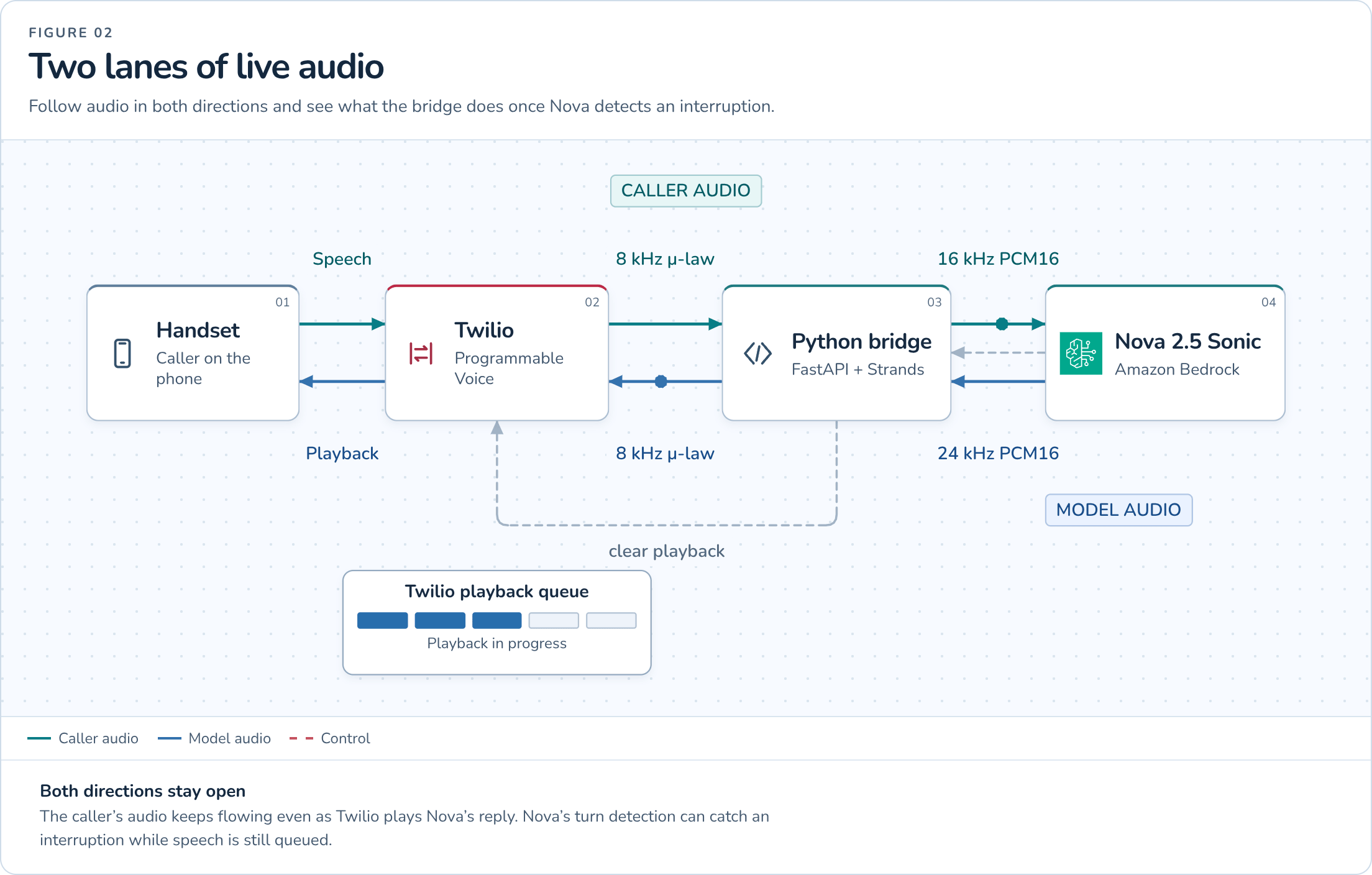
Open the interactive explorer and choose Live audio to follow a frame in each direction.
On the way in, the audio adapter decodes media.payload, expands μ-law to PCM, and resamples from 8 to 16 kHz. On the way back, it downsamples from 24 to 8 kHz, encodes μ-law, and wraps the bytes in base64. The bridge sends the result as a Twilio media message with the current streamSid. Keep a stateful resampler for each direction of each call: starting from scratch for every chunk breaks continuity at frame boundaries. Send raw audio bytes without a WAV or other file header, as required by the Twilio message protocol. Upsampling also doesn’t recover frequencies that were lost in the phone network.
These are the two transformations inside the handlers. Call this factory once per call, then enqueue the decoded caller PCM for the model:
from app.audio import NovaToTwilioBridge, TwilioToNovaBridge

def make_audio_handlers():
    to_nova = TwilioToNovaBridge()
    to_twilio = NovaToTwilioBridge()

    def decode_caller_audio(event):
        return to_nova.process_payload(event["media"]["payload"])

    async def send_model_audio(websocket, stream_sid, pcm_24k):
        await websocket.send_json({
            "event": "media",
            "streamSid": stream_sid,
            "media": {"payload": to_twilio.process_to_payload(pcm_24k)},
        })

    return decode_caller_audio, send_model_audio
3. Keep the model stream open in both directions
Here’s the core configuration behind the Strands bridge. The sample wraps the provider adapter to observe tool submission and usage; the audio settings are the same:
from strands.bidi.agent import BidiAgent
from strands.bidi.models import BedrockNovaSonicModel

model = BedrockNovaSonicModel(
    model_id="amazon.nova-2-5-sonic",
    region="us-east-1",
    voice="tiffany",
    audio={
        "input": {"sample_rate": 16000},
        "output": {"sample_rate": 24000},
    },
)
agent = BidiAgent(model=model, system_prompt="You are a concise phone assistant.")
The app runs agent.run(inputs=[...], outputs=[...]) with custom input and output adapters. A queue feeds PCM chunks in as they arrive; the output handler transcodes each audio delta and sends it to Twilio as it arrives. A one-time text cue in the same model session triggers the model’s opening line, so the agent can speak first. Strands handles Bedrock’s InvokeModelWithBidirectionalStream API and can renew the provider connection before its eight-minute limit, carrying conversation history forward. The telephone call and the model connection have separate lifecycles.
4. Let Nova handle turn-taking and clear playback on interruption
The bridge resamples the caller’s audio and forwards it continuously. There’s no application-side VAD gate that trims silence. Optional NOVA_ENDPOINTING_SENSITIVITY is forwarded to Nova’s turn detection: HIGH ends a caller turn sooner; LOW gives the caller more time to pause. Leaving it blank preserves the provider default. Endpointing determines when to respond; barge-in handles a caller speaking over an existing response.
Stopping Nova’s response leaves Twilio’s playback buffer untouched. When Strands reports a BidiBargeInEvent, the bridge resets its outbound resampler and invalidates pending playback evidence before sending Twilio clear. That ordering becomes critical during a farewell.
The disconnect architecture: one owner, three confirmations
For each call, the FastAPI media handler gives one CallLifecycleController ownership of teardown. The controller supervises the Twilio WebSocket reader and Strands run as peer tasks. It observes Nova’s tool, audio, and transcript events, handles Twilio’s mark on the Media Stream, and uses the separate Calls REST API to end the telephone call by CallSid. These are different signals: Nova finished generating, Twilio played the marked audio, and Twilio returned a terminal call status.
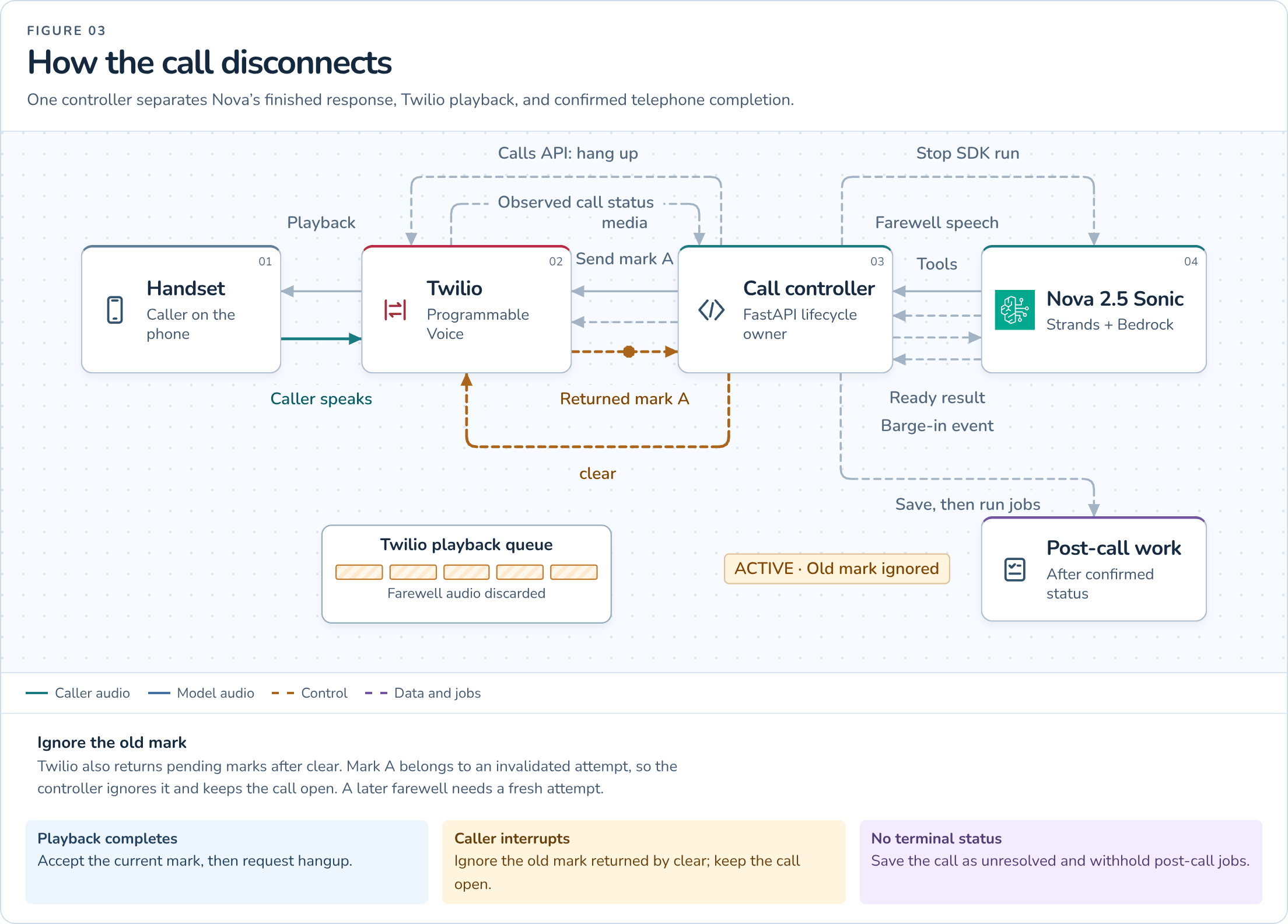
Open the interactive explorer to step through normal playback, a caller interruption, or an unexpected exit in the Disconnect tab. Diagram timing is illustrative.
-
Settle tools before granting the goodbye. Nova requests
end_conversation(language=…). The controller waits for pending business tools and their writes to settle, then returns a fresh attempt ID. Nova callsbegin_farewell(attempt_id). This second step checks that earlier tool results were recorded by Strands and successfully sent to Nova, then returns the exact goodbye for the selected language. The controller only considers speech produced after that grant was sent to the model. This keeps an old response or a queued tool result from being mistaken for the authorized farewell. See the two closing tools and model send observer. -
Prove playback before committing. The controller waits for the current response to finish with nonempty audio that the bridge sent to Twilio and a completed transcript containing the required closing phrase. It sends a unique
markbehind the audio. To commit the hangup, the returned name andStreamSidmust match, and the mark must still belong to the current attempt, model connection generation, and output revision.Twilio also returns pending marks after
clear, even when it discarded the corresponding audio. The controller invalidates the attempt before clearing the buffer, so the old mark can’t close the call. A newer response or provider reconnect can also make old evidence stale. If the wait times out, the controller abandons the attempt and can resume listening. A valid mark confirms Twilio’s playback state; it can’t prove what the person heard.There’s also a race between the local
marksend and the WebSocket reader. The returned acknowledgement can arrive before the local send finishes. Both paths check whether they can commit, and both send completion and acknowledgement must be recorded before the controller closes admission. -
End the call, then verify it ended. When the current mark is accepted, the controller blocks new output and tool work before yielding to a shared cleanup task. A caller hangup, WebSocket failure, or unexpected SDK exit converges on that same task. It stops the Strands run, requests
status=completedon the Twilio Call resource, closes the WebSocket, and drains retained writes before saving analytics. If the REST result is uncertain, the Twilio client reads back the status and can retry the update once. Unless Twilio reports a terminal status, the app records the outcome as unresolved and withholds the post-call workflow, including any follow-up SMS.
The default wait limits are 20 seconds for tool settlement, 15 seconds for farewell generation, and 30 seconds for the playback acknowledgement. These are limits on how long to wait for evidence, not delays before hanging up.
The offline teardown tests cover wrong-stream marks, caller disconnects, and unresolved Twilio status. The audio tests inject a provider interruption event and verify that the bridge reacts; they don’t measure VAD accuracy, pronunciation, or handset latency. Those still need live calls on the devices and networks you expect to support.
Keep the live path responsive
An asynchronous model tool can run while audio is still moving, but your code can block the call if it does synchronous I/O on the same loop. The sample moves blocking store writes off the audio loop and only reports an update as saved once the write returns. After the terminal call record is saved, the demo calculates Sonic usage cost and can run transcript analysis with a separate Bedrock text model. A validated promise to pay can trigger a Twilio SMS; the demo does not process payments. For production, use a durable job queue and deduplicate mutations and messages so a retry can’t repeat a business action.
Secure and measure the boundaries. Before a real deployment, authenticate operator routes and validate X-Twilio-Signature on the WebSocket upgrade with the Twilio SDK, using the public URL Twilio requested. Limit concurrent calls, bound the demo’s audio queue, set timeouts, and protect transcripts with access controls and a retention policy. Measure model time to first audio separately from handset playback: network transit and Twilio buffering add delay. Correlate Twilio and model events by call and stream ID. Track barge-in, reconnects, tool errors, and Nova usage costs separately from Twilio charges. Test on real handsets with pauses, noise, and language switches before changing NOVA_ENDPOINTING_SENSITIVITY; quicker turn detection can cut off someone who is thinking.
If the phone rings but you hear silence, trace the call in order: did Twilio connect to /media, did the app receive start, did Bedrock accept the stream, and did the app send a media reply? If the reply arrives but sounds distorted, inspect the sample rate, codec, and absence of a file header before tuning the prompt.
The repo includes an AWS deployment template and architecture guide for ECS Fargate, a load balancer, and DynamoDB. For long calls, verify that your ingress forwards WebSocket upgrades and that its timeout settings fit your expected call length. Load test concurrent calls and test task shutdown while calls are active before you depend on the stack. The TutLinks walkthrough of Amazon Nova web grounding covers a separate Nova capability for looking up current information; this phone demo uses its own application tools instead.
For your first use case, choose one outcome you can verify, such as a confirmed appointment or a callback request. Test what happens when a different person answers, the caller interrupts the goodbye, a scheduling tool fails, or the handset disconnects mid-call. For account-specific flows, the demo’s spoken identity check is only a prompt: require real verification before loading sensitive details into the model, and give callers a way to reach a person. A successful voice demo is one where the caller hears the right thing and the backend records the same outcome.