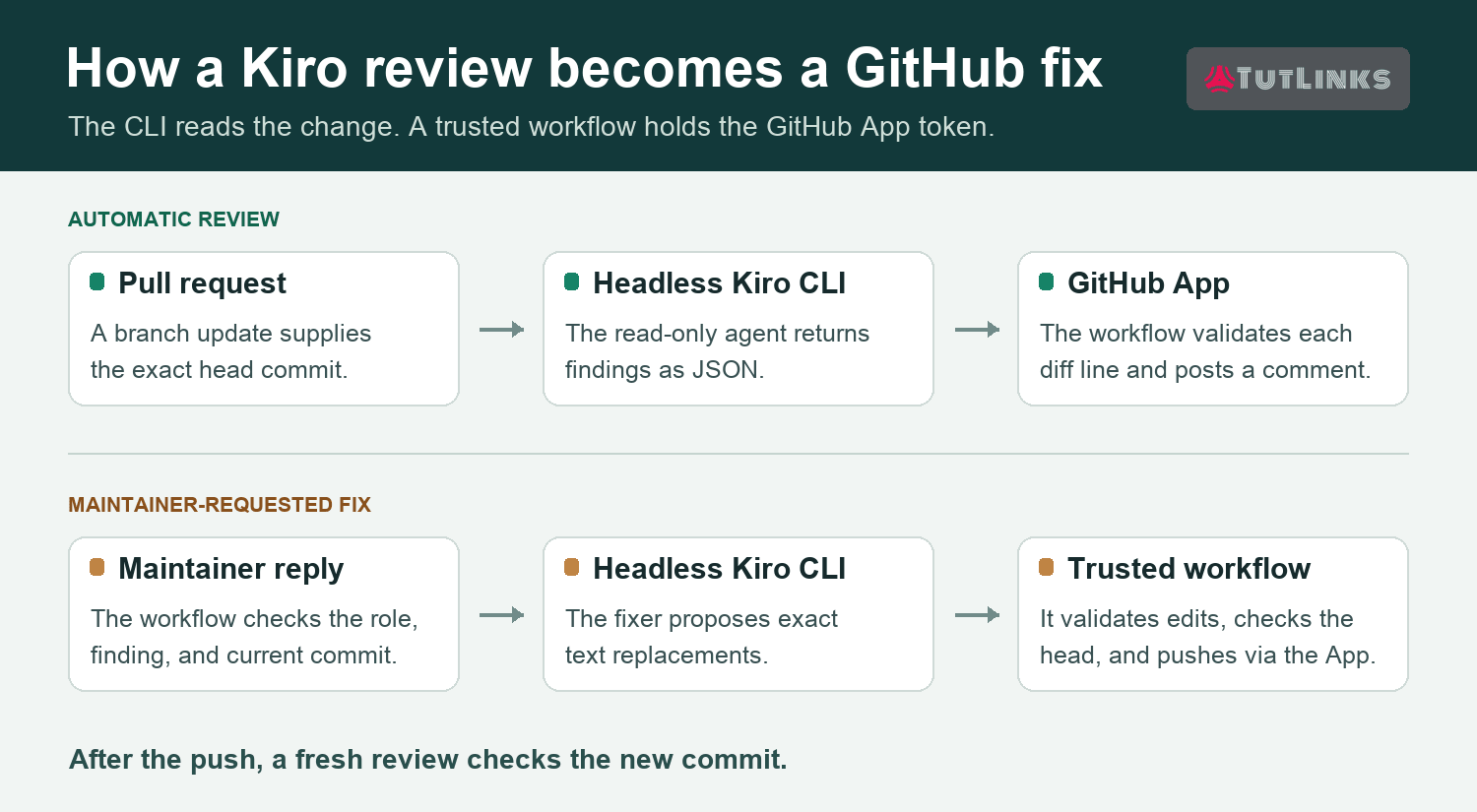
To automate GitHub code review, run Kiro CLI in headless mode from GitHub Actions. The --no-interactive flag lets Kiro review a pull request (PR) without waiting for someone at a terminal. Kiro returns its findings as JSON. A GitHub App posts each one beside the line it describes. A maintainer can then request a fix. The workflow validates the edit, pushes a commit, and starts a fresh review.
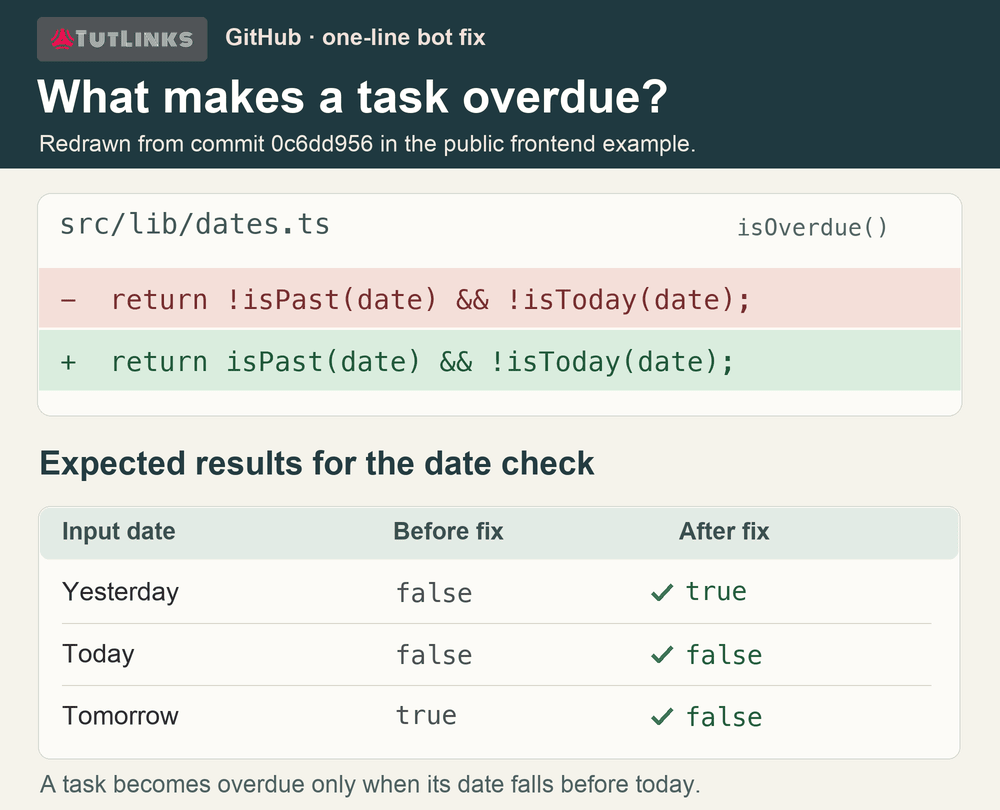
In one public PR, an overdue-task check treated future dates as overdue. A maintainer asked the bot for a fix, and the resulting commit removed one misplaced negation. See the one-line fix.
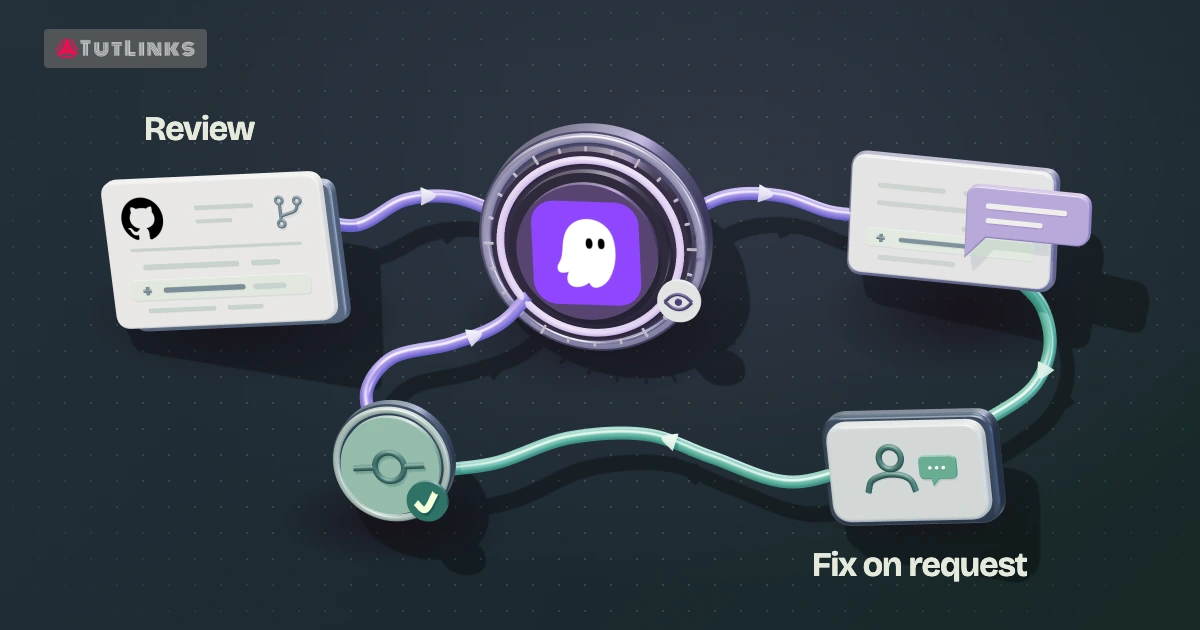
Each pull request update starts an automated code review. Follow the five steps below for a named bot and fixes on request. For inline reviews alone, you can stop after step 3 and use step 5 to verify the result. If the standard github-actions[bot] identity suits you, the built-in token option below lets you skip App registration. The linked example workflows use the custom App. For repositories hosted on GitLab, follow the companion guide to automating GitLab code review and fixes with Kiro CLI in headless mode.
1. Set up a GitHub App for automated code review
Start with a repository where you can configure GitHub Actions, install a GitHub App, and open a test PR. Use a branch in the same repository and a contributor you trust for this first run. GitHub can run workflow YAML from the proposed change. Checking out scripts from the default branch later does not make contributor-edited YAML trusted. For external contributions, use a workflow or worker you control that fetches the PR head (the latest commit on its branch) as data. GitHub workflow events · TutLinks guide to publishing a repository on GitHub.
You’ll also need a Kiro subscription that supports API keys. On a managed account, an administrator may need to enable key generation. Have the key ready for the Actions secret in step 2. Kiro API key authentication.
In GitHub, open Settings → Developer settings → GitHub Apps → New GitHub App for the account or organization that will own the bot. Choose a recognizable name and enter your project’s homepage. Disable the App webhook for this design. GitHub Actions already receives the PR and comment events. Set the repository permissions as follows.
| Repository permission | Access | What uses it |
|---|---|---|
| Metadata | Read | Identify the repository. |
| Pull requests | Read and write | Read the diff and post inline findings. |
| Issues | Read and write | Post optional replies in the PR conversation. Actions delivers incoming comment events. |
| Contents | Read and write | Push a maintainer-authorized fix. Read access is sufficient for a review-only App. |
Install the App on the selected repository, generate its private key, and keep the PEM file outside the checkout. Leave workflow-management permission disabled. GitHub App permissions.
2. Add the bot settings and secrets
Open Repository Settings → Secrets and variables → Actions. Under Variables, set the three values below. Under Secrets, add the Kiro API key and the complete PEM for the App private key.
| Type | Name | Value |
|---|---|---|
| Variable | KIRO_REVIEWER_CLIENT_ID | The App’s client ID, used to request an installation token. |
| Variable | KIRO_REVIEWER_APP_ID | The numeric App ID, used for the bot commit identity. |
| Variable | KIRO_REVIEWER_LOGIN | The App login slug, such as reviewer-bot, without @ or [bot]. |
| Secret | KIRO_API_KEY | The API key issued by Kiro. |
| Secret | KIRO_REVIEWER_PRIVATE_KEY | The private key generated in step 1. |
Scope each credential to the step that consumes it. The Kiro CLI step receives the Kiro key. The GitHub token action receives the App private key. The trusted posting or push step receives a short-lived installation token. Set persist-credentials: false on both checkouts so the Git remote does not retain a credential Kiro could read. GitHub App authentication in Actions.
3. Run the GitHub pull request review with Kiro CLI
Start with the four linked files from the same revision of the public frontend example. Place them at the paths below and commit them to the default branch before opening a separate test PR. Read the workflow first to see which files it checks out and the arguments it passes to each script.
.github/workflows/kiro-pr-review.ymlresponds to PRs that are opened, reopened, updated, or marked ready for review. It skips drafts. Review workflow..kiro/agents/pr-reviewer.jsondefines the reviewer’s prompt, restricts its tools to reading and searching, and disables loading repository MCP configuration. Reviewer agent..github/scripts/extract-kiro-review.pyparses the final response and checks that each finding points to a visible line on the right side of the diff (the proposed version of the file). Finding validator..github/scripts/extract-kiro-credits.pyreads the usage metadata for the Actions job summary. Credit parser.
The workflow resolves the PR head commit, checks out the trusted automation at the workspace root, and places that exact PR commit under review-target/. Keep the built-in token permissions at contents: read and pull-requests: read. From the trusted root, the workflow creates .kiro/review-input/pr.diff and context.md, installs the CLI, and invokes the named agent like this.
"$HOME/.local/bin/kiro-cli" chat \
  --v2 --agent pr-reviewer --no-interactive \
  --output-format stream-json \
  --trust-tools=fs_read,grep \
  'Review this pull request and return the required KIRO_REVIEW_JSON payload.' \
  > "$RUNNER_TEMP/kiro-review.jsonl" 2>&1
The example selects the V2 engine because its parser reads runFinished.data.finalText. The agent configuration limits which tools exist. The --trust-tools flag lets those tools run without a prompt in CI. If you change engines, verify the tool names and response format together. Kiro headless CLI reference.
Here is the kind of finding the posting step consumes. This illustrative payload uses a line number from a hypothetical test diff. Use the actual line in your PR when validating or posting.
{
  "findings": [{
    "severity": "P2",
    "path": "src/lib/dates.ts",
    "line": 42,
    "title": "Future tasks appear overdue",
    "body": "Negating isPast(date) includes future dates. Use isPast(date) and keep the check that excludes today."
  }]
}
The agent wraps its JSON in <KIRO_REVIEW_JSON> tags. Each finding has a severity, repository-relative path, line, title, and explanation. The validator checks the path, diff line, severity, message length, and finding count before the App posts. When adapting the posting step, recheck the PR head and pass the reviewed SHA as commit_id when creating the review. If the branch has advanced, review the new commit. An empty findings array completes a clean review quietly.
When a pull request changes again, reconcile stale findings after the new review succeeds. The sample marks its inline comments with <!-- kiro-inline-review -->. Match both that marker and your App’s exact bot login before retiring an old comment. A clean run can clear earlier findings without posting another summary.
Try it on a throwaway branch. In a date helper that marks past tasks overdue, flip isPast(date) to !isPast(date). Open a non-draft PR and look under Files changed for a finding that explains why future tasks now appear overdue. A model can miss a bug, so check the job outcome and run your date tests as well. To rerun the workflow on an existing PR, run gh workflow run kiro-pr-review.yml -f pr_number=42 from your checkout, substituting your PR number. See an inline finding on a separate PR.
4. Add optional fixes requested by a maintainer
Add .kiro/agents/pr-fixer.json, .github/scripts/apply-kiro-fix.py, and .github/workflows/kiro-pr-fix.yml to your default branch. The fixer reuses the credit parser. Its workflow listens for both PR conversation comments and inline review replies. Replace reviewer-bot in these examples with your App login. Fixer agent · Fixer workflow · Edit validator.
| Where to comment | Command | What it selects |
|---|---|---|
| Reply in the bot’s inline thread | @reviewer-bot fix this | The finding in that thread. |
| PR conversation | @reviewer-bot fix discussion_r123456789 | One finding. Replace the example ID with the anchor from the comment’s permalink. |
| PR conversation | @reviewer-bot fix all | The bot’s eligible findings on the current PR head. |
Before Kiro runs, match the full command, reject bot requesters, and check the human’s current repository permission through GitHub. Require write, maintain, or admin. Verify through GitHub that your App posted the selected finding on this PR at its current head. Decline fork pushes and allow one fix at a time per PR.
Kiro returns a plan containing a path, exact old text, and replacement text for each edit. Trusted code must verify the entire plan before it writes any files. Require the old text to match exactly once. The linked validator checks the target file and enforces a protected-file list. Extend that check to reject symlinks in every parent directory, resolve the destination under the target root, and check the resolved path against protected files. Include CI workflows, agent configuration, keys, and lockfiles. Useful starting limits are 20 replacements and 2,000 affected lines per fix.
The example checks for a nonempty diff and runs git diff --check. Require your project’s tests to pass before pushing. Run them in an isolated job without Kiro or GitHub write credentials. Immediately before a normal push, check that the PR head still matches the reviewed commit. If another commit arrived, run a fresh review. After a successful push, dispatch a new review against the new head. Successful fix run.
5. Verify the result and track Kiro credits
For a review-only installation, open the Actions summary and compare its head SHA with the latest commit on the test PR. Check the inline finding or the clean-run result and read the review credit total.
If you enabled fixes, compare the original finding, the bot’s fix commit, and the head SHA in the next review. For the overdue-task example, a date before today should be overdue, today should be excluded, and a future date should stay clear. Those three cases make a more meaningful acceptance test than a green whitespace check. Example pull request.
Trace one fix from request to commit. In the public example, the maintainer selected a single finding by its discussion ID. The Actions run lists issue_comment as its trigger. For this event, GitHub reports the default-branch commit as the workflow’s SHA. To verify what changed on the pull request, inspect the fix commit’s parent and its patch. The fix in src/lib/dates.ts has parent 4b3a7d1 and removes one negation. Checking only the green workflow badge would miss whether the bot touched the intended line. Maintainer’s request · Fix run · Commit and parent.
Inspect the public fix with the GitHub CLI
You can reproduce the inspection from your terminal using GitHub CLI with read access to the public example. The commands below query GitHub’s API. They also work outside a checkout, which makes them convenient for a reviewer looking at someone else’s pull request. Start with the conversation comment. It records the exact command the maintainer sent and the discussion they selected, even after later reviews reconcile the inline comments.
repo=windson/todo-frontend
fix=0c6dd956eb7b1ade705e55f94ca9314fb4f01aa1

gh api "repos/$repo/issues/comments/6580411357" --jq .body
gh api "repos/$repo/actions/runs/41467545182" \
  --jq '[.event, .head_sha, .conclusion] | @tsv'
gh api "repos/$repo/commits/$fix" \
  --jq '.parents[0].sha, (.files[] | select(.filename == "src/lib/dates.ts") | .patch)'
gh api "repos/$repo/pulls/2" \
  --jq '[.merged, .head.sha, .base.ref] | @tsv'
Read the three revisions in order. The workflow started from an issue comment on the default-branch revision 6c5ff0f. The patch shows what changed between 4b3a7d1 and the fix commit 0c6dd95. The pull request’s final head was 81db6e9 after a later sync. A difference between these values is expected here. For a new run, use the finding’s recorded head to identify the parent on which the fixer should operate. Use the resulting fix commit to identify the revision for the fresh review.
If you want to see which expression survives on the default branch now, read the file without specifying a ref. This matters for repositories whose default branch has a name other than main, and for branches where later commits change the helper again.
gh api "repos/$repo/contents/src/lib/dates.ts" \
  -H 'Accept: application/vnd.github.raw+json' |
  grep -A 3 'function isOverdue'
In this example, the PR API identifies feat/todo-frontend-scaffold as the base branch. Compare that value with the branch you intend to verify. A release branch can keep a different version of the helper even after a fix has reached the repository’s default branch.
For your own GitHub code review, preserve the finding URL, the selected command, the checked head, and the resulting commit in the Actions summary. A second maintainer can use that record to repeat the same check after a branch sync. If the patch selected the wrong line, pause the fixer workflow in Actions while you investigate. The separate reviewer can continue to post findings. Inspect any running fix job before assuming a queued push was cancelled. If a change has already landed, revert that commit through the repository’s normal review process and verify the expression on the affected branch again.
Also try two commands that should leave the branch untouched. Have a read-only collaborator request a fix, then try a maintainer request against an outdated finding. Check the logs for the rejected request and confirm that neither run pushed a commit.
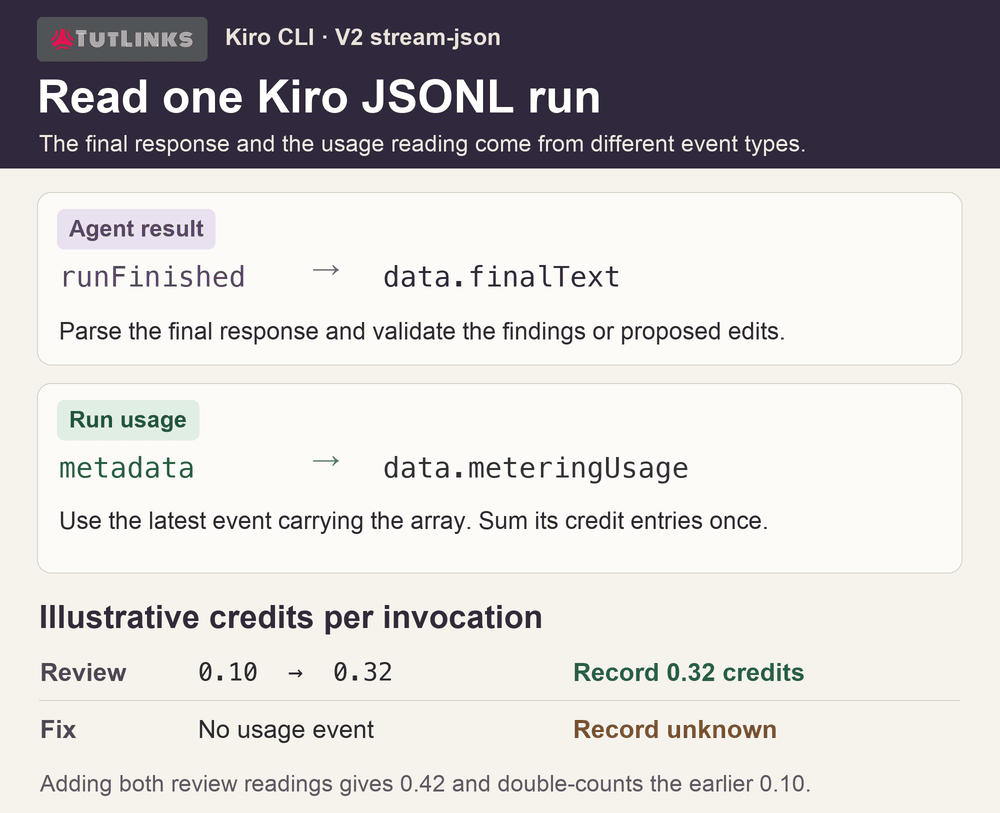
Open Actions → workflow run → Summary. The example writes separate usage summaries for reviews and fixes. Its parser reads JSON Lines, takes the latest metadata event containing meteringUsage, and sums the credit or credits entries in that event using decimal arithmetic. An absent reading is unknown. Earlier events can repeat a running total, so adding every event can overstate usage. This field was observed in CLI output and can change between releases.
| What you see | What to check |
|---|---|
| The review runs but the PR stays quiet | Look for an empty findings array and a successful run. A failed parser or missing secret should be visible in the workflow log. |
| GitHub rejects the inline comment | Compare its repository-relative path and right-side line with the exact diff and head SHA reviewed. |
| The bot ignores a fix command | Check the mention, the requester’s role, the discussion ID, and whether a newer commit made the finding stale. |
| The fix lands but no new review appears | Inspect the dispatch step. If you use the built-in token, GitHub suppresses most resulting workflow events. |
Credits show unknown | Inspect the parser against a captured stream from the same CLI engine. Preserve the review outcome even when usage is unavailable. |
Can I run automated code reviews in GitHub without a custom bot?
Yes. For review-only automation, use the built-in GITHUB_TOKEN with contents: read and pull-requests: write. Comments appear as github-actions[bot]. In the review workflow, remove the App-token generation step and use github.token as the github-token input for the posting action. Keep that token in the trusted posting step. You still need the Kiro API key for the reviewer. This variant is a good fit when your team wants to automate GitHub code reviews and developers prefer to make every edit themselves. Choose a GitHub App when you want a named reviewer and a separate identity for fix commits. GitHub workflow triggering rules.